
例:じゃんけん
ストーリーがその行に来るとじゃんけんのミニゲームをステージに表示し、勝負がつくまでストーリーを止め、結果に応じてストーリーを分岐させる完全なプラグイン
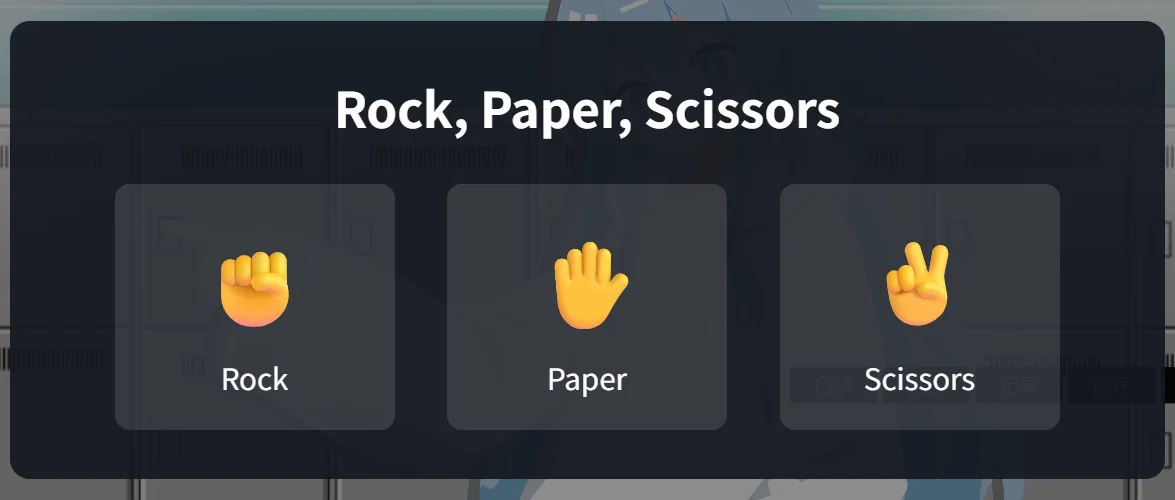
本稿では、空のフォルダから 1 つのプラグインを作り、シーンの中で実際に遊ぶところまで進めます。このプラグインはストーリーアクション Rock, Paper, Scissors を追加します。ストーリーがその行に来るとミニゲームがステージに現れ、プレイヤーが勝つか負けるまで、ストーリーはその行にとどまります。結果はセーブ変数に書き込まれ、次の /if 行がそれに応じてストーリーを分岐させます。
プラグイン API の 3 つの部分を使います。
| 部分 | エントリー | ここでの役割 |
|---|---|---|
app.services.story.actions | studio | アクションをシーンエディターに追加し、行を書き込みます。 |
app.game.storyActions | runtime | ストーリーがその行に来たときに実行されます。ストーリーはその終了を待ちます。 |
app.game.ui.overlay と app.game.state | runtime | ステージの上にゲームを描き、結果をストーリーの変数に書き込みます。 |
プラグインを作ったことがなければ、先にプラグインを作るを読んでください。本稿はそのテンプレートを前提にしています。
ファイル
テンプレートを rps という名前のフォルダにコピーし、yarn install を実行します。build.mjs、tsconfig.json、package.json はそのまま使います(パッケージ名は変更します)。src/nodes.ts、src/main.ts、src/runtime.ts は削除します。このプラグインはブループリントノードを追加せず、2 つのエントリーは以下で書き直すためです。
1. マニフェスト
{
  "manifestVersion": 2,
  "id": "yourname.rps",
  "name": "Rock, Paper, Scissors",
  "version": "1.0.0",
  "publisher": "Your Name",
  "description": "A rock, paper, scissors mini-game that the story waits on.",
  "entries": { "studio": "main.js", "runtime": "runtime.js" },
  "contributes": {
    "runtimeCapabilities": ["ui.overlay", "state.read", "state.write"]
  },
  "permissions": []
}- 両方のエントリーが必要です。studio エントリーがアクションをシーンエディターに追加し、runtime エントリーがゲームの中でそれを実行します。
ui.overlayにより、runtime エントリーはステージの上に描画できます。state.readとstate.writeにより、結果をストーリー変数に書き込めます。- ストーリーアクションは
contributesで宣言しません。その id はプラグイン id で始まる必要があります。
インストール時のプロンプトに表示されるのは、この 3 つの能力だけです。
2. 共有する id
2 つのエントリーは同じ id で同じアクションを指すため、その id は両者が共有するモジュールに置きます。
// Shared by both entries: the ids, and how a row's params are read back.

export const PLUGIN_ID = "yourname.rps";
export const PLAY_ACTION = `${PLUGIN_ID}.play`;

export type PlayParams = {
    /** The saved variable that receives "win" or "lose". */
    variable: string;
};

export function readParams(params: Record<string, unknown>): PlayParams {
    return { variable: typeof params.variable === "string" ? params.variable : "" };
}
3. ストーリーアクション
studio エントリーは、作者が挿入するアクションを登録します。
import { definePlugin, type StoryBlock } from "narraleaf-studio/plugin";
import { PLAY_ACTION, PLUGIN_ID, readParams } from "./action";

export default definePlugin({
    setup(app) {
        app.services.story.actions.register({
            id: PLAY_ACTION,
            label: "Rock, Paper, Scissors",
            detail: "Play a round on the stage and store the result in a saved variable.",
            // The text typed after the command is the name of the variable to write.
            createBlock: ({ generateId, initialText }): StoryBlock => ({
                id: generateId(),
                kind: "action",
                parentId: null,
                childrenIds: [],
                payload: {
                    action: "plugin",
                    pluginId: PLUGIN_ID,
                    actionId: PLAY_ACTION,
                    params: { variable: (initialText ?? "").trim() },
                },
            }),
            describe: params => {
                const { variable } = readParams(params);
                return variable
                    ? `Rock, Paper, Scissors → ${variable}`
                    : "Rock, Paper, Scissors (no variable)";
            },
        });
    },
});createBlockはプラグイン独自の行を返します。action: "plugin"に、プラグイン id、アクション id、パラメーターを持たせます。paramsには任意の JSON 値を入れられます。initialTextは、作者がコマンドの後に入力したテキストです。このアクションはそれを、結果を受け取る変数の名前として読みます。describeは、その行がシーンエディターに表示するテキストです。指定しないと行にはlabelが表示され、変数名が見えなくなります。
シーンにこの行がある間、プロジェクトはこのプラグインに依存し、プロジェクトのすべての実行とビルドにプラグインが含まれます。
4. ゲーム
ゲームは普通の React コンポーネントです。React はホストが提供するため、コンポーネントは他のモジュールと同じように react を使い、ビルドではそれを external のままにします。
import { useEffect, useState, type CSSProperties } from "react";

export type Hand = "rock" | "paper" | "scissors";
export type Outcome = "win" | "lose";

const HANDS: { hand: Hand; label: string; symbol: string }[] = [
    { hand: "rock", label: "Rock", symbol: "✊" },
    { hand: "paper", label: "Paper", symbol: "✋" },
    { hand: "scissors", label: "Scissors", symbol: "✌️" },
];

const BEATS: Record<Hand, Hand> = { rock: "scissors", paper: "rock", scissors: "paper" };

/** How long both hands stay on screen before the round ends or starts again. */
const REVEAL_MS = 1200;

type Round = { player: Hand; opponent: Hand };

function judge({ player, opponent }: Round): Outcome | "draw" {
    if (player === opponent) {
        return "draw";
    }
    return BEATS[player] === opponent ? "win" : "lose";
}

function symbolOf(hand: Hand): string {
    return HANDS.find(entry => entry.hand === hand)!.symbol;
}

export function RpsGame({ onFinish }: { onFinish: (outcome: Outcome) => void }) {
    const [round, setRound] = useState<Round | null>(null);

    useEffect(() => {
        if (!round) {
            return;
        }
        const result = judge(round);
        const timer = setTimeout(() => {
            if (result === "draw") {
                setRound(null);
            } else {
                onFinish(result);
            }
        }, REVEAL_MS);
        return () => clearTimeout(timer);
    }, [round, onFinish]);

    const play = (player: Hand) => {
        const opponent = HANDS[Math.floor(Math.random() * HANDS.length)].hand;
        setRound({ player, opponent });
    };

    const result = round ? judge(round) : null;

    return (
        <div style={styles.backdrop}>
            <div style={styles.panel}>
                <div style={styles.title}>Rock, Paper, Scissors</div>
                {round ? (
                    <>
                        <div style={styles.hands}>
                            <span>{symbolOf(round.player)}</span>
                            <span style={styles.versus}>vs</span>
                            <span>{symbolOf(round.opponent)}</span>
                        </div>
                        <div style={styles.result}>
                            {result === "win" ? "You win!" : result === "lose" ? "You lose." : "Draw. Again!"}
                        </div>
                    </>
                ) : (
                    <div style={styles.choices}>
                        {HANDS.map(({ hand, label, symbol }) => (
                            <button key={hand} type="button" style={styles.choice} onClick={() => play(hand)}>
                                <span style={styles.symbol}>{symbol}</span>
                                <span>{label}</span>
                            </button>
                        ))}
                    </div>
                )}
            </div>
        </div>
    );
}

// Sizes are in container units of the backdrop, which covers the stage, so the game scales with it.
const styles: Record<string, CSSProperties> = {
    backdrop: {
        position: "absolute",
        inset: 0,
        containerType: "size",
        display: "flex",
        alignItems: "center",
        justifyContent: "center",
        background: "rgba(0, 0, 0, 0.45)",
        // The overlay layer lets clicks through; the game takes them for itself.
        pointerEvents: "auto",
        fontFamily: "sans-serif",
        color: "#fff",
    },
    panel: {
        display: "flex",
        flexDirection: "column",
        alignItems: "center",
        gap: "4cqh",
        padding: "5cqh 6cqw",
        borderRadius: "2cqh",
        background: "rgba(20, 24, 32, 0.92)",
    },
    title: { fontSize: "5cqh", fontWeight: 600 },
    choices: { display: "flex", gap: "3cqw" },
    choice: {
        display: "flex",
        flexDirection: "column",
        alignItems: "center",
        gap: "1cqh",
        width: "16cqw",
        padding: "3cqh 0",
        border: "none",
        borderRadius: "1.5cqh",
        background: "rgba(255, 255, 255, 0.12)",
        color: "inherit",
        fontSize: "3cqh",
        cursor: "pointer",
    },
    symbol: { fontSize: "9cqh" },
    hands: { display: "flex", alignItems: "center", gap: "4cqw", fontSize: "12cqh" },
    versus: { fontSize: "4cqh", opacity: 0.7 },
    result: { fontSize: "4.5cqh" },
};- オーバーレイはステージ全体を覆い、ポインターを受け取りません。背景に
pointerEvents: "auto"を設定しているため、ボタンはクリックを受け取り、ステージの他の場所をクリックしてもダイアログには届きません。 - ステージはウィンドウの大きさで描かれるため、サイズはピクセルではなく背景のコンテナ単位で指定します。
- あいこのときは勝負をやり直します。コンポーネントが報告するのは
"win"か"lose"だけです。
5. 行を実行する
runtime エントリーは、同じアクション id で、ストーリーがその行に来たときの処理を登録します。
import { defineRuntimePlugin } from "narraleaf-studio/runtime";
import { PLAY_ACTION, readParams } from "./action";
import { RpsGame, type Outcome } from "./RpsGame";

export default defineRuntimePlugin({
    setup(app) {
        app.game.storyActions.register({
            id: PLAY_ACTION,
            // The story stays on the row until this promise settles.
            run: ({ params, signal, game }) => new Promise<void>(resolve => {
                const { variable } = readParams(params);
                const overlay = game.ui?.overlay;
                if (!overlay) {
                    game.log("warning", "ui.overlay is not available here; the round is skipped.");
                    resolve();
                    return;
                }

                let settled = false;
                const settle = () => {
                    if (settled) {
                        return;
                    }
                    settled = true;
                    unmount();
                    resolve();
                };

                const finish = (outcome: Outcome) => {
                    if (!signal.aborted && variable) {
                        game.state?.set?.("saved", variable, outcome);
                    }
                    settle();
                };

                const unmount = overlay.mount(() => <RpsGame onFinish={finish} />);

                // Rolled back past the row, or a save was loaded: take the game off the stage.
                signal.addEventListener("abort", settle, { once: true });
            }),
        });
    },
});
ゲームはこの行を次のように扱います。
- ストーリーは待ちます。
runが返した promise が確定すると、次の行が始まります。ステージのクリック、送りキー、オートモード、スキップでは、この行を越えません。 - 結果は
game.state.set("saved", variable, outcome)でストーリーに戻ります。 promise が確定する前に書き込まれるため、次の行はすでにその値を読めます。 - ゲームは
overlay.mountでステージの上に描かれます。 描画関数はプラグイン自身のコンポーネントの要素を返すため、コンポーネントは描画をまたいで状態を保ちます。mountが返すクリーンアップで、ステージから取り除きます。 signalが中断されるのは、ゲームがステージにある間に、プレイヤーがこの行より前に巻き戻したとき、またはセーブを読み込んだときです。プラグインはゲームを取り除き、何も書き込みません。- ゲームがステージにある間に取ったセーブを読み込むと、この行がもう一度実行され、ゲームが最初から表示されます。
runの中で投げられたエラーはゲームのログに書き込まれ、ストーリーは続きます。
ステージのない場所では game.ui が存在しないため、冒頭の判定により、勝負をせずにストーリーが続きます。
6. ビルドとインストール
yarn builddist/ に manifest.json、main.js、runtime.js ができます。ランチャーの Plugins(プラグイン)ページで Install from folder(フォルダからインストール)を使ってインストールし、プロンプトを承認します。手順はプラグインのインストールにあります。
7. ストーリーで使う
変数を宣言する
Variables(変数)を開き、Saved variables(セーブ変数)に変数を追加します。名前を rpsResult にし、型を String(文字列)にします。
行を挿入する
シーンの新しい行に /rock rpsResult と入力して Enter を押します。行は Rock, Paper, Scissors → rpsResult と表示されます。
/rock だけを入力すると、コマンドメニューにこのアクションが表示されます。コマンドの後の語が変数名なので、同じアクションを他のセーブ変数に向けて書くこともできます。
結果で分岐する
次の行に /if rpsResult == "win" と入力して Enter を押します。勝ったときのセリフを If の下に追加します。Condition(条件)の行で Else(それ以外)を選び、負けたときのセリフをその下に追加します。
条件の中のテキスト値はダブルクォートで囲みます。
遊んでみる
ゲームより前の行で Play from this row(この行から再生)を押すか、Dev Mode でプロジェクトを実行します。ストーリーがその行に来ると、ゲームがステージに現れます。勝つか負けるとゲームはステージから消え、ストーリーは対応する分岐で続きます。
この先
- 別のミニゲームも同じ形で作れます。行を書き込むストーリーアクション、コンポーネントをマウントして終わったら resolve する
run、そして結果を入れる変数です。 - 結果を複数の変数に書き込んだり、行から設定を読み取ったりするには、
paramsにキーを増やし、describeでそれを表示します。 - 行を挿入した後も作者が変数名を変えられるようにするには、登録の
paramsでそれをstringのフィールドとして宣言します。Properties パネルがその行に表示します。Properties パネルのフィールドを参照してください(Studio 1.6.0 以降)。 - 各部分のリファレンス:story、
game.storyActions、ui.overlay、state