
示例:石头剪刀布
一个完整的插件:故事走到它的那一行时,把石头剪刀布小游戏放到舞台上,故事停在这一行直到分出胜负,再按结果走向不同的剧情
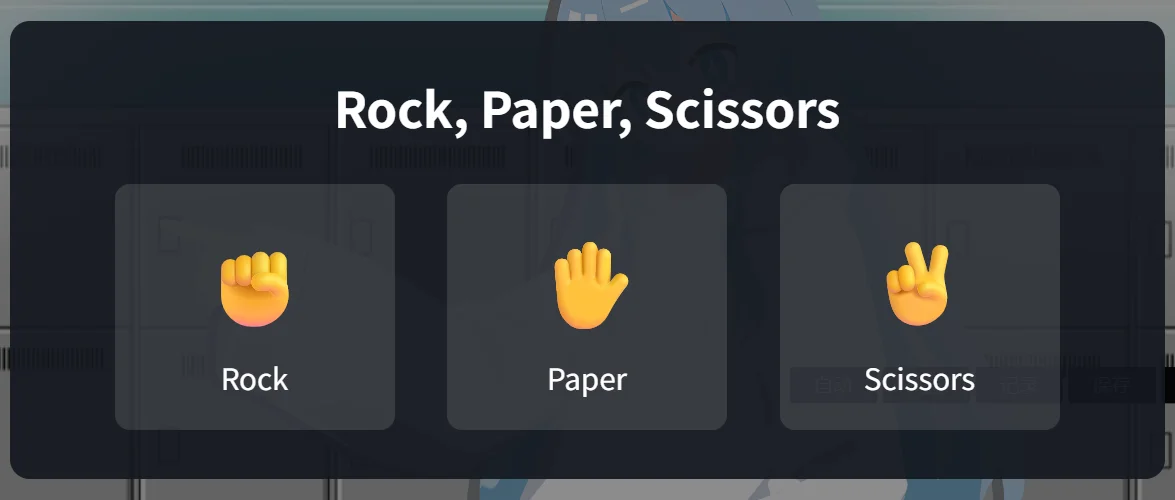
本页从一个空文件夹开始,做出一个插件,并在场景里实际玩到它。这个插件添加一个故事动作 Rock, Paper, Scissors。故事走到这一行时,小游戏出现在舞台上,故事停在这一行,直到玩家赢或输。结果写进一个存档变量,下一行的 /if 按它把故事带向不同的分支
用到插件 API 的三个部分:
| 部分 | 入口 | 在这里做什么 |
|---|---|---|
app.services.story.actions | studio | 把动作加入场景编辑器,并写出这一行 |
app.game.storyActions | runtime | 故事走到这一行时运行,故事等它结束 |
app.game.ui.overlay 与 app.game.state | runtime | 在舞台上画出小游戏,并把结果写进故事的变量 |
如果还没有搭过插件,先读创建第一个插件。本页沿用那里的模板
文件
把模板复制到名为 rps 的文件夹并运行 yarn install。保留它的 build.mjs、tsconfig.json 和 package.json(改掉包名)。删除 src/nodes.ts、src/main.ts 和 src/runtime.ts:这个插件不添加蓝图节点,两个入口在下文重写
1. 清单
{
  "manifestVersion": 2,
  "id": "yourname.rps",
  "name": "Rock, Paper, Scissors",
  "version": "1.0.0",
  "publisher": "Your Name",
  "description": "A rock, paper, scissors mini-game that the story waits on.",
  "entries": { "studio": "main.js", "runtime": "runtime.js" },
  "contributes": {
    "runtimeCapabilities": ["ui.overlay", "state.read", "state.write"]
  },
  "permissions": []
}- 两个入口都需要。studio 入口把动作加入场景编辑器,runtime 入口在游戏里运行它
ui.overlay让 runtime 入口在舞台上绘制。state.read和state.write让它把结果写进故事变量- 故事动作不需要在
contributes里声明。它的 id 必须以插件 id 开头
安装提示只列出这三项能力
2. 共用的 id
两个入口用同一个 id 指同一个动作,所以把它放在两者共用的模块里
// Shared by both entries: the ids, and how a row's params are read back.

export const PLUGIN_ID = "yourname.rps";
export const PLAY_ACTION = `${PLUGIN_ID}.play`;

export type PlayParams = {
    /** The saved variable that receives "win" or "lose". */
    variable: string;
};

export function readParams(params: Record<string, unknown>): PlayParams {
    return { variable: typeof params.variable === "string" ? params.variable : "" };
}
3. 故事动作
studio 入口注册作者插入的动作
import { definePlugin, type StoryBlock } from "narraleaf-studio/plugin";
import { PLAY_ACTION, PLUGIN_ID, readParams } from "./action";

export default definePlugin({
    setup(app) {
        app.services.story.actions.register({
            id: PLAY_ACTION,
            label: "Rock, Paper, Scissors",
            detail: "Play a round on the stage and store the result in a saved variable.",
            // The text typed after the command is the name of the variable to write.
            createBlock: ({ generateId, initialText }): StoryBlock => ({
                id: generateId(),
                kind: "action",
                parentId: null,
                childrenIds: [],
                payload: {
                    action: "plugin",
                    pluginId: PLUGIN_ID,
                    actionId: PLAY_ACTION,
                    params: { variable: (initialText ?? "").trim() },
                },
            }),
            describe: params => {
                const { variable } = readParams(params);
                return variable
                    ? `Rock, Paper, Scissors → ${variable}`
                    : "Rock, Paper, Scissors (no variable)";
            },
        });
    },
});createBlock返回插件自己的行:action: "plugin",带上插件 id、动作 id 和参数。params里可以放任何 JSON 值initialText是作者在命令后面输入的文字。这个动作把它当作接收结果的变量名describe是这一行在场景编辑器里显示的文字。不提供时这一行显示label,变量名就看不到了
只要场景里还有这一行,工程就依赖这个插件,工程的每次运行和构建都会带上它
4. 小游戏
小游戏是一个普通的 React 组件。React 由宿主提供,所以组件像使用其他模块一样使用 react,构建时把它留作 external
import { useEffect, useState, type CSSProperties } from "react";

export type Hand = "rock" | "paper" | "scissors";
export type Outcome = "win" | "lose";

const HANDS: { hand: Hand; label: string; symbol: string }[] = [
    { hand: "rock", label: "Rock", symbol: "✊" },
    { hand: "paper", label: "Paper", symbol: "✋" },
    { hand: "scissors", label: "Scissors", symbol: "✌️" },
];

const BEATS: Record<Hand, Hand> = { rock: "scissors", paper: "rock", scissors: "paper" };

/** How long both hands stay on screen before the round ends or starts again. */
const REVEAL_MS = 1200;

type Round = { player: Hand; opponent: Hand };

function judge({ player, opponent }: Round): Outcome | "draw" {
    if (player === opponent) {
        return "draw";
    }
    return BEATS[player] === opponent ? "win" : "lose";
}

function symbolOf(hand: Hand): string {
    return HANDS.find(entry => entry.hand === hand)!.symbol;
}

export function RpsGame({ onFinish }: { onFinish: (outcome: Outcome) => void }) {
    const [round, setRound] = useState<Round | null>(null);

    useEffect(() => {
        if (!round) {
            return;
        }
        const result = judge(round);
        const timer = setTimeout(() => {
            if (result === "draw") {
                setRound(null);
            } else {
                onFinish(result);
            }
        }, REVEAL_MS);
        return () => clearTimeout(timer);
    }, [round, onFinish]);

    const play = (player: Hand) => {
        const opponent = HANDS[Math.floor(Math.random() * HANDS.length)].hand;
        setRound({ player, opponent });
    };

    const result = round ? judge(round) : null;

    return (
        <div style={styles.backdrop}>
            <div style={styles.panel}>
                <div style={styles.title}>Rock, Paper, Scissors</div>
                {round ? (
                    <>
                        <div style={styles.hands}>
                            <span>{symbolOf(round.player)}</span>
                            <span style={styles.versus}>vs</span>
                            <span>{symbolOf(round.opponent)}</span>
                        </div>
                        <div style={styles.result}>
                            {result === "win" ? "You win!" : result === "lose" ? "You lose." : "Draw. Again!"}
                        </div>
                    </>
                ) : (
                    <div style={styles.choices}>
                        {HANDS.map(({ hand, label, symbol }) => (
                            <button key={hand} type="button" style={styles.choice} onClick={() => play(hand)}>
                                <span style={styles.symbol}>{symbol}</span>
                                <span>{label}</span>
                            </button>
                        ))}
                    </div>
                )}
            </div>
        </div>
    );
}

// Sizes are in container units of the backdrop, which covers the stage, so the game scales with it.
const styles: Record<string, CSSProperties> = {
    backdrop: {
        position: "absolute",
        inset: 0,
        containerType: "size",
        display: "flex",
        alignItems: "center",
        justifyContent: "center",
        background: "rgba(0, 0, 0, 0.45)",
        // The overlay layer lets clicks through; the game takes them for itself.
        pointerEvents: "auto",
        fontFamily: "sans-serif",
        color: "#fff",
    },
    panel: {
        display: "flex",
        flexDirection: "column",
        alignItems: "center",
        gap: "4cqh",
        padding: "5cqh 6cqw",
        borderRadius: "2cqh",
        background: "rgba(20, 24, 32, 0.92)",
    },
    title: { fontSize: "5cqh", fontWeight: 600 },
    choices: { display: "flex", gap: "3cqw" },
    choice: {
        display: "flex",
        flexDirection: "column",
        alignItems: "center",
        gap: "1cqh",
        width: "16cqw",
        padding: "3cqh 0",
        border: "none",
        borderRadius: "1.5cqh",
        background: "rgba(255, 255, 255, 0.12)",
        color: "inherit",
        fontSize: "3cqh",
        cursor: "pointer",
    },
    symbol: { fontSize: "9cqh" },
    hands: { display: "flex", alignItems: "center", gap: "4cqw", fontSize: "12cqh" },
    versus: { fontSize: "4cqh", opacity: 0.7 },
    result: { fontSize: "4.5cqh" },
};- 覆盖层盖住整个舞台,并且不接收指针。背景层设置了
pointerEvents: "auto",所以按钮能接收点击,点在舞台其他位置也不会传到对话框 - 舞台按窗口大小绘制,所以尺寸用背景层的容器单位,而不是像素
- 平局会重新开一局。组件只报告
"win"或"lose"
5. 运行这一行
runtime 入口用同一个动作 id,注册故事走到这一行时要做的事
import { defineRuntimePlugin } from "narraleaf-studio/runtime";
import { PLAY_ACTION, readParams } from "./action";
import { RpsGame, type Outcome } from "./RpsGame";

export default defineRuntimePlugin({
    setup(app) {
        app.game.storyActions.register({
            id: PLAY_ACTION,
            // The story stays on the row until this promise settles.
            run: ({ params, signal, game }) => new Promise<void>(resolve => {
                const { variable } = readParams(params);
                const overlay = game.ui?.overlay;
                if (!overlay) {
                    game.log("warning", "ui.overlay is not available here; the round is skipped.");
                    resolve();
                    return;
                }

                let settled = false;
                const settle = () => {
                    if (settled) {
                        return;
                    }
                    settled = true;
                    unmount();
                    resolve();
                };

                const finish = (outcome: Outcome) => {
                    if (!signal.aborted && variable) {
                        game.state?.set?.("saved", variable, outcome);
                    }
                    settle();
                };

                const unmount = overlay.mount(() => <RpsGame onFinish={finish} />);

                // Rolled back past the row, or a save was loaded: take the game off the stage.
                signal.addEventListener("abort", settle, { once: true });
            }),
        });
    },
});
游戏对这一行的处理:
- 故事等待。
run返回的 promise 结束后,下一行才开始。点击舞台、推进键、自动模式和跳过都不会越过这一行 - 结果经
game.state.set("saved", variable, outcome)回到故事。 它在 promise 结束之前写入,所以下一行已经能读到 - 小游戏经
overlay.mount画在舞台上方。 渲染函数返回插件自己组件的元素,所以组件在多次渲染之间保留状态。mount返回的清理函数把它从舞台上撤下 signal被中止:小游戏还在舞台上时,玩家回退到这一行之前,或读取了存档。插件撤下小游戏,不写入任何东西- 小游戏在舞台上时存的档,读取时会重新执行这一行:小游戏从头出现
run里抛出的错误会写进游戏日志,故事继续
没有舞台的地方 game.ui 不存在,所以开头的判断让故事不进行这一局就继续
6. 构建与安装
yarn builddist/ 里现在有 manifest.json、main.js 和 runtime.js。在启动器的 插件 页面用 从文件夹安装 安装它,并批准权限提示。步骤见安装插件
7. 在故事里使用
声明变量
打开 变量,在 存档变量 下添加一个变量,命名为 rpsResult,类型设为 字符串
插入这一行
在场景的新行里输入 /rock rpsResult 并按 Enter。这一行显示为 Rock, Paper, Scissors → rpsResult
只输入 /rock 时,命令菜单里会列出这个动作。命令后面的词就是变量名,所以同一个动作也可以写给其他存档变量
按结果分支
在下一行输入 /if rpsResult == "win" 并按 Enter。把赢了之后的台词加在 如果 下面。在 条件 行上选择 否则,把输了之后的台词加在它下面
条件里的文字值要写在双引号里
试玩
在小游戏之前的某一行上按 从这一行开始播放,或者在开发模式中运行工程。故事走到这一行时,小游戏出现在舞台上。赢或输之后,小游戏离开舞台,故事进入对应的分支继续
接下来
- 换一个小游戏也是同样的结构:一个写出这一行的故事动作,一个挂载组件、结束时 resolve 的
run,再加一个存放结果的变量 - 要把结果写进多个变量,或者从这一行读取设置,就在
params里放更多的键,并在describe里显示出来 - 要让作者在插入这一行之后还能改变量名,就在注册的
params里把它声明成string字段,属性面板会在这一行上显示它。见属性面板里的字段(Studio 1.6.0 及以后) - 各部分的参考:story、
game.storyActions、ui.overlay 和 state